Extend C Drive Easily
Without Losing Data
Resize and extend C drive in Windows 11/10/8/7 or server even when Disk Management cannot extend the volume.
- check_circle Extend C drive without formatting
- check_circle Extend C drive without reinstalling Windows
- check_circle Merge free space for another partition
- check_circle Move partitions to unlock unallocated space
- check_circle Support Windows 11/10/8/7 and server
180+
Countries
80M+
Global Users
6000+
Partners
17+
Years Experience
You Can Extend C Drive in Any Situation
Don't let disk management limitations stop you. We solve the most common "Low Disk Space" issues effortlessly.
C Drive Turns Red
Extend the C drive or free up space with App Mover in just a few clicks.
No Unallocated Space Available
Use Allocate Free Space to borrow space from another partition.
Extend Volume Greyed Out
Move partitions and unlock the Extend Volume option.
Recovery Partition Blocks Expansion
Relocate recovery partitions without deleting them.
Upgrading to a Larger SSD
Clone the disk and expand the C drive simultaneously.
Windows 11 System Drive Running Out of Space
Extend the C drive without reinstalling Windows 11.
PartitionAssistant Makes C Drive Expansion Easy
Professional-grade features designed for both beginners and IT pros.
Allocate Free Space
Transfer unused space from D: or other partitions directly to the C drive without creating unallocated space first.
Merge Partitions
Combine adjacent partitions to create a larger system drive.
Move/Resize Partition
Move partitions to make unallocated space adjacent to the C drive.
Extend Partition Wizard
Automatically find available space and extend the C drive.
Clone to Larger SSD
Migrate Windows to a larger SSD and extend the system partition during migration.
Move Apps or Folders
Move installed applications and large program files from the C drive to another partition without reinstallation.
How to Extend C Drive in Windows 11/10
Open “Extend Partition Wizard”
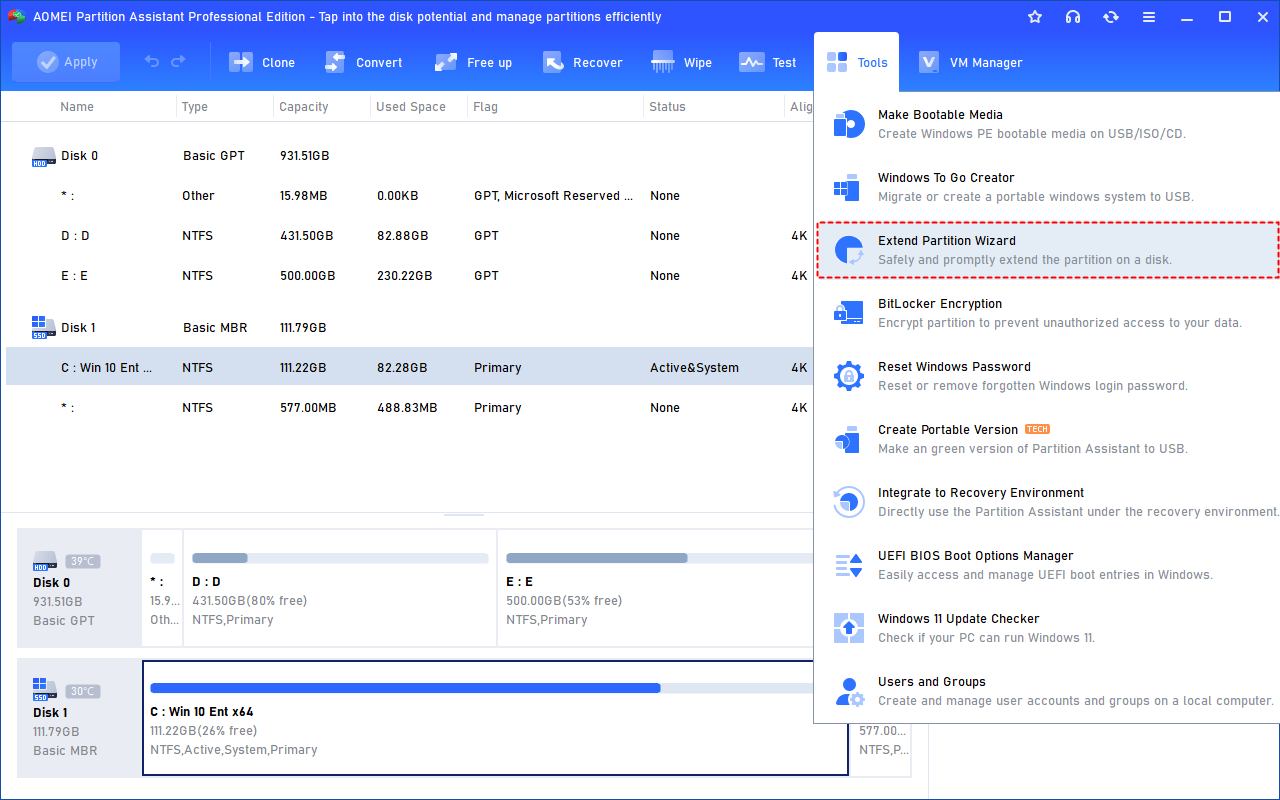
Download and install PartitionAssistant on your computer. Open Extend Partition Wizard in the Tools list.
Extend System Partition
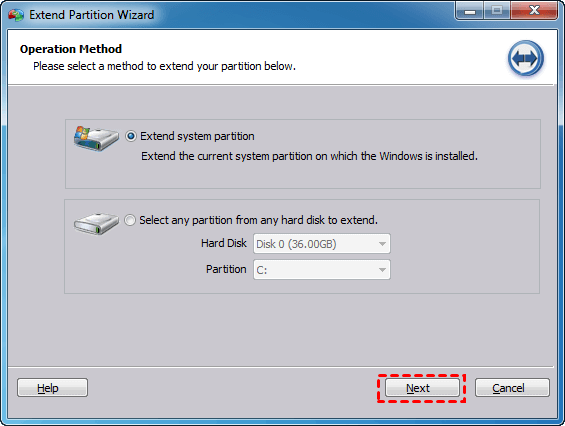
Choose Extend system partition as your operation method.
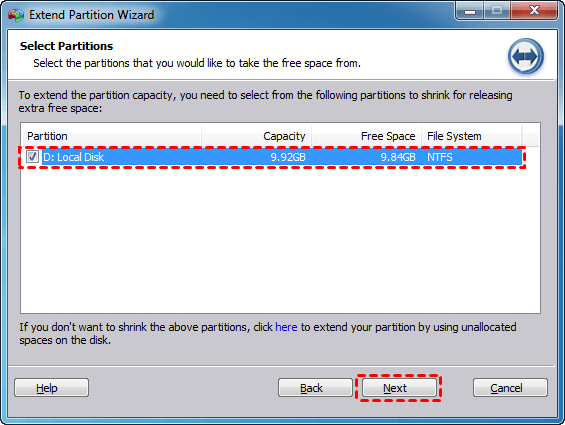
Select Partition to Release Space
Choose the partition which you want to extend c drive space from.
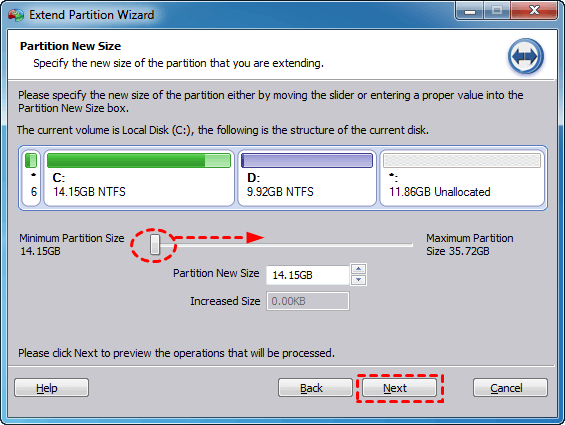
Set the Extended C Drive Size
Move the slider to decide the extended size of C drive, then click Next.
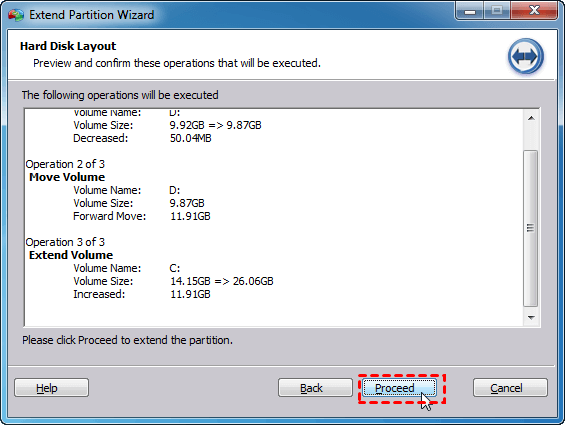
Run Extend Partition Wizard
Click Proceed to confirm the operation and start the task.
What Can You Do with PartitionAssistant?
Everything you need to optimize, protect, and manage your data.
Initialize Disk
Initialize Disk is designed for preparing a new or unallocated disk for use by an operating system.
PC Cleaner
Precisely detect and remove junk files to free up disk space, including system and registry junk inaccessible for non-professional users.
App Mover
Moves programs or large folders from one drive to another, especially helpful to free up C: drive to improve PC performance.
Monitor Disk Temperature
Monitors disk temperature in real time to detect overheating risks and avoid performance loss or data damage.
SSD Secure Erase Wizard
Reset your SSD to its factory state for peak performance. Compatible with most modern SSD, such as Samsung, Intel, Kingston, etc.
4K Partition Alignment
Make partition align to improve the speed of reading and writing.
Disk Speed/Surface Test
Test disk read/write speeds, detect bad sectors, and repair disk errors to evaluate performance and ensure storage reliability.
Disk Health
Monitor hard drive health in Windows to prevent any unforeseen crashes and the subsequent data loss they would cause.
Need More Space on Your C Drive?
PartitionAssistant provides flexible tools to extend C drive, move partitions, merge partitions, and manage disk space with ease.
Windows 11/10/8.1/8/7 & Server